
A ChemStation blank run is one of those small tricks that can save a surprising amount of troubleshooting time. In this post I will share a ChemStation tip that I really wish I had known earlier, because it would have made my work with gas chromatography much easier.
Why a ChemStation Blank Run Is Useful
A blank run becomes extremely useful during troubleshooting. Sometimes your GC analysis shows additional peaks compared to a normal run. These are often called ghost peaks.
In this situation, the first step should always be isolating the source of the problem.
Is the contamination coming from the sample, or is it coming from the GC system itself?
Running a blank run makes this check very simple.
If peaks appear during the blank run, the contamination likely exists somewhere inside the GC system, such as:
- Inlet
- Column
- Detector
However, if no peaks appear during the blank run, the GC system is likely clean. In that case, you should start suspecting the syringe or the sample preparation instead.
Instead of trimming columns or adjusting detector parameters blindly, this quick isolation step saves a lot of unnecessary work. The next logical step would be to try:
- A new syringe
- Fresh wash vials
As a result, you avoid playing a guessing game with parts of the GC that are not actually causing the issue.
How to Perform a ChemStation Blank Run
Performing a blank run is surprisingly simple.
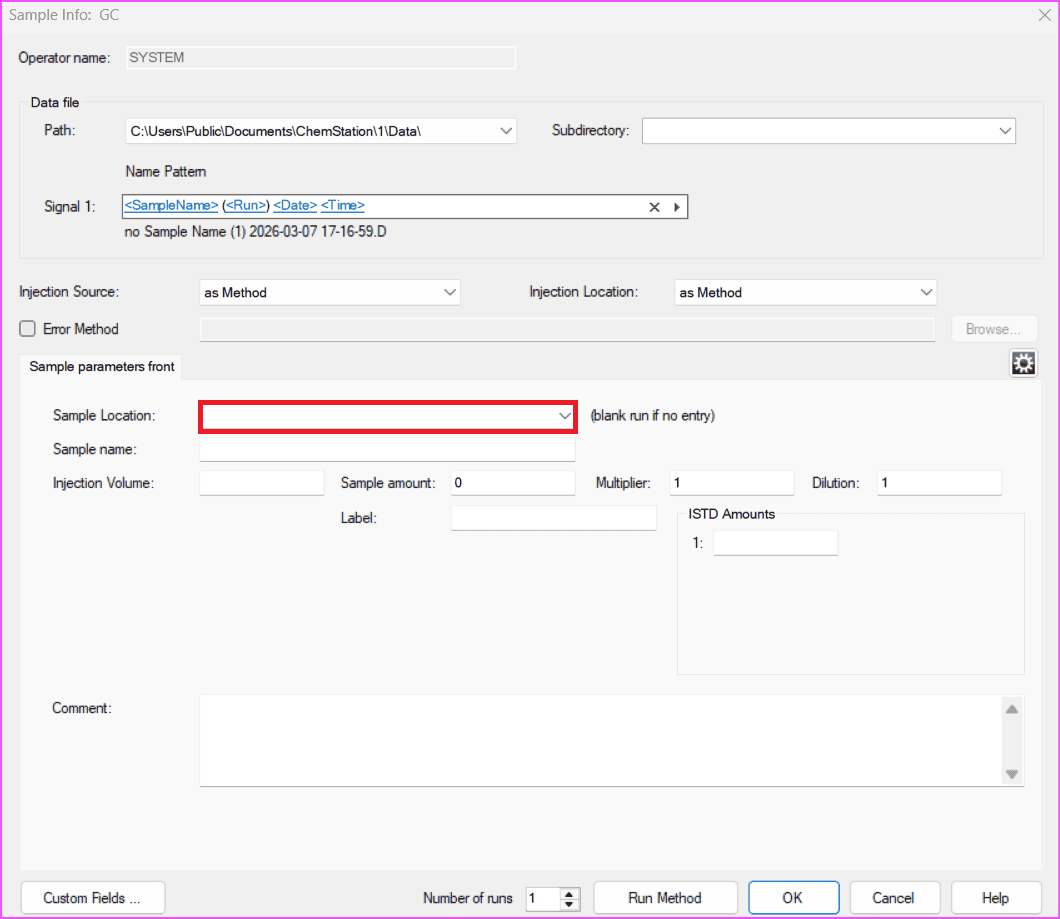
When using an automatic liquid sampler, you only need to leave the “Sample Location” field empty.
This works in both locations:
- Sequence Table
- Run Control → Sample Info
When ChemStation sees an empty sample location, it automatically assumes that you want to run a blank. As a result, the GC starts the run without injecting anything.
This is the easiest way to start a blank run.
Using ChemStation Blank Run for Automatic GC Runs
A ChemStation blank run is also useful for gas analysis or LPG analysis.
In many laboratories, operators run these samples manually run by run. However, what if you want the GC to run through a sequence automatically?
That can save a lot of time.
You can achieve this using the same idea behind a ChemStation blank run, or by configuring a gas sampling valve.
Configure a Gas Sampling Valve in ChemStation
Another way to start a ChemStation blank run automatically is to configure a valve as a gas sampling valve.
The word “configure” might sound complicated, but the process is actually very simple.
Follow these steps:
- Open OpenLab ChemStation Online
- Select Instrument → Edit GC Parameters
- Choose the Configuration tab
- Select Miscellaneous
On the right side of the screen, you will see valve positions.
Simply change one of them to Gas Sampling Valve.
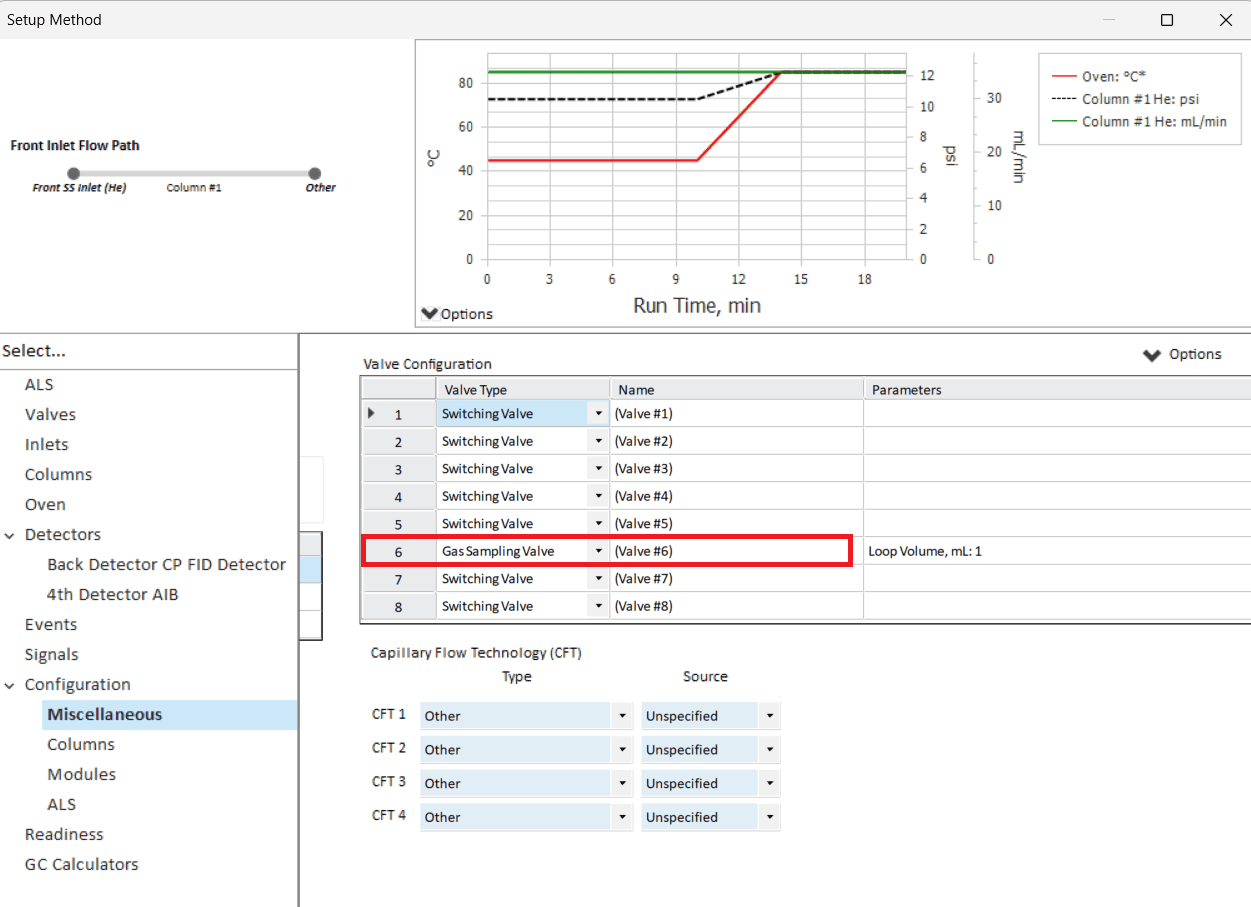
It is a good idea to choose a dummy valve position that does not physically exist on the GC. This way, you avoid accidentally triggering a real injection.
Once finished, click OK to close the Edit Parameters window.
Selecting the Injection Source
Next, you need to define the injection source.
Follow these steps:
- Select Instrument → Select Injection Source
- Choose the Gas Sampling Valve you defined earlier
- Click OK
- Save the method
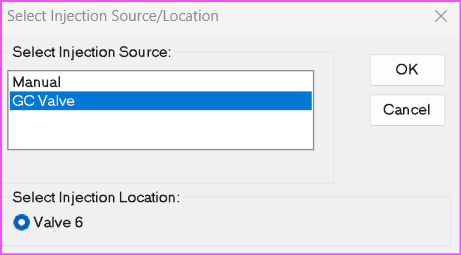
Now whenever you run that method, the ChemStation blank run will start automatically without waiting for any injection signal. Of course, the GC must still be in ready status before starting.
Key Takeaways
A ChemStation blank run is a simple but powerful troubleshooting technique.
Key points to remember:
- It helps determine whether ghost peaks come from the GC or the sample
- If peaks appear during the blank run, the GC system may be contaminated
- If no peaks appear, the issue likely comes from the syringe or sample preparation
- Leaving Sample Location empty is the fastest way to perform a ChemStation blank run
- Configuring a Gas Sampling Valve allows the GC to start automatically
Even though this trick is simple, it can save a lot of time when diagnosing GC problems.
Explore More ChemStation Tips
If you work regularly with Agilent ChemStation, small workflow tricks like this can make daily GC operation much smoother.
You might also find these guides useful in OpenLab ChemStation GC Guides series: