
If you regularly run sequences on a GC using ChemStation, here is a ChemStation sequence command trick that I wish I had known much earlier. This small adjustment can make daily operation much smoother and prevent a common issue that many labs face.
In my case, the command is used to automatically load a standby method when the GC finishes running a sequence. Many laboratories already rely on a standby method when the GC is idle. However, operators often forget to load it manually after a sequence finishes.
Because of that, a simple command can save time, protect the instrument, and make the GC ready for the next run.
Why a Standby Method Matters in GC Operation
In most labs I have worked with, a standby method is almost a must-have. The reason is simple: it keeps the instrument in a safe and efficient state when it is not actively running samples.
Typically, a standby method does several useful things:
- Turns off unnecessary gases such as detector gases
- Reduces carrier gas flow
- Raises the oven temperature to keep the column warm
As a result, the GC stays in a saving mode while still remaining ready for the next analysis.
However, the problem is not the standby method itself. The real problem is that operators often forget to load it at the end of a sequence.
The Problem With Manual Standby Loading
In theory, the solution is simple. Operators only need to add one additional line at the end of the sequence that loads the standby method.
However, in reality things rarely work that way.
From my experience, many operators simply forget to add that extra step. Consequently:
- The GC finishes the sequence
- The instrument stays in the last analytical method
- No saving mode is activated
- The oven may cool down
Because of this, the GC may take a long time to stabilize the next day before it can be used again.
Fortunately, a ChemStation sequence command can solve this problem automatically.
How to Add the ChemStation Sequence Command
A simple command can instruct the software to load the standby method immediately after the sequence finishes.
To implement this, it is best to always run the GC in sequence mode. That way, the standby method will automatically be triggered when the sequence ends.
Step 1: Open Sequence Parameters
When defining your sequence, open the Sequence Parameters window.
Then:
- Tick the box “Post-Sequence command/macro”
- Add the following command.
loadmethod “C:\Users\Public\Documents\ChemStation\1\Methods”,”Standby.M”
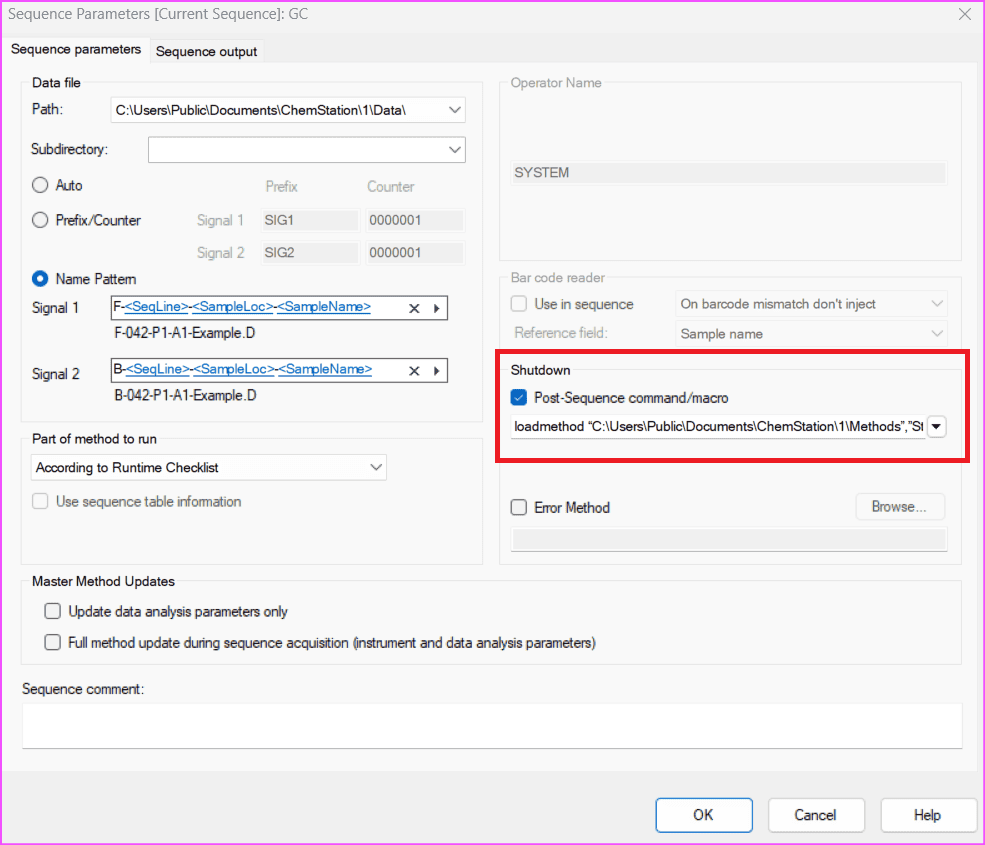
The quotes must be included for the command to work correctly.
You will notice that the ChemStation sequence command consists of three parts:
- The instruction to load a method
- The folder path where the method is located
- The method name
Each system may therefore have a different path or method name. The example above comes from my own computer.
Using the Same ChemStation Sequence Command for Shutdown Methods
Interestingly, the same ChemStation sequence command can also be used to load a shutdown method instead of a standby method.
This approach can be useful for laboratories that only run the GC occasionally.
In that case, you can:
- Create a shutdown method first
- Change the command to load that method name instead
The rest of the ChemStation sequence command remains exactly the same.
Important Tip: Do Not Add It in Runtime Checklist
One final point is worth mentioning.
I recommend adding the ChemStation sequence command through Sequence Parameters, as described earlier.
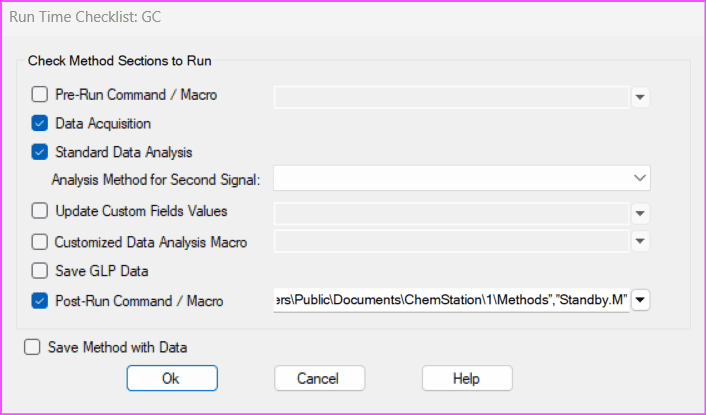
Technically, ChemStation also allows you to add commands through:
Method → Runtime Checklist → Post-Run Command/Macro
However, when running a sequence, ChemStation tends to behave unexpectedly if the command is placed there.
For that reason, it is better not to use that location.
Key Takeaways
A simple ChemStation sequence command can prevent many small operational headaches in the lab.
Key points to remember:
- A standby method keeps the GC in a safe saving mode
- Operators often forget to manually load the standby method
- A ChemStation sequence command can automatically load it
- The command should be added in Sequence Parameters
- Avoid placing the command in Runtime Checklist
Even though this trick is small, it can make daily GC operation much more reliable.
Before You Go
If you work with gas chromatography and want to make your workflow smoother, small configuration tips like this can save a lot of time.
Feel free to share how you manage standby or shutdown methods in your GC systems. I’m always curious to learn how other labs handle these small but important details.
You might also find these guides useful in OpenLab ChemStation GC Guides series: